
How to buy seats, companies, numbers and add-ons from Genaya
When something you ask Genaya for costs your organization money, Genaya shows one purchase card in the chat. It says what you are buying, what it costs today and every month after, and which card pays. One click on Confirm purchase pays for it and does what you asked. Nothing is bought until you press it.
What you can buy from the chat
| Ask Genaya | What you buy | Price |
|---|---|---|
| "Invite dana@harborpointdental.com to the team" | A team member past the seats your plan includes. The same card comes up when you turn a deactivated member back on, or change an External employee into a team member who signs in. | $39 a month |
| "Add a company called Cedar Ledger Advisors" | A company past the companies your plan includes | $99 a month |
| "Get us a local number in 512" | A phone number past the numbers your plan includes | $2.49 a month for a local number, $3.49 a month for a toll-free number |
| "Turn on Call Intelligence" | An add-on: Call Intelligence, AI Calls Receptionist, Video Intelligence or AI Chat Receptionist | $79 a month for Call Intelligence, $99 a month for each of the other three |
| "Upgrade us to the Business plan" | A higher plan. Today you pay only for the part of the billing period that is left, then the new price. A lower plan is picked on Settings > Billing. | Your plan's price on Settings > Billing |
| "Start my plan now" (on the free trial) | The plan your trial picked, or another one you name, starting today instead of when the trial ends | The plan's full price today |
| "Add $50 to my prepaid balance" | Money on your prepaid balance, for Genaya's own work once your plan's included use runs out. On the computer; on the phone, top up in Settings > Billing. | The amount you pick, $20 to $5,000, once |
A seat or a company your plan still includes needs no purchase: Genaya shows its usual card and nothing is charged. A phone number always comes on a purchase card, because a number is bought from the phone carrier; one your plan includes reads Included, nothing charged today. A domain and a new LLC you ask Genaya for use the same purchase card on the web.
What the card shows
- You are buying: one row for each thing with its price, for example "Extra team member seat, $39.00 a month".
- Due today: the amount charged now. A monthly extra is charged only for the part of the billing month that is left, and the line under it says until when, for example "Prorated to Dec 1".
- Then: what it costs after today and when, for example "Then $39.00 a month, next on Dec 1, 2026". For a domain it is the price a year, charged 40 days before the domain expires.
- Your new monthly total for add-ons and extras, for example "All add-ons after this: $156.00 a month".
- What your plan includes, for example "Your Pro plan includes 3 team members. You have 3."
- The card that pays: your default card, for example "Visa ending 4242".
- The line that says you authorize the charge, with a link to the Terms of Service.
- Confirm purchase, and Not now under it.
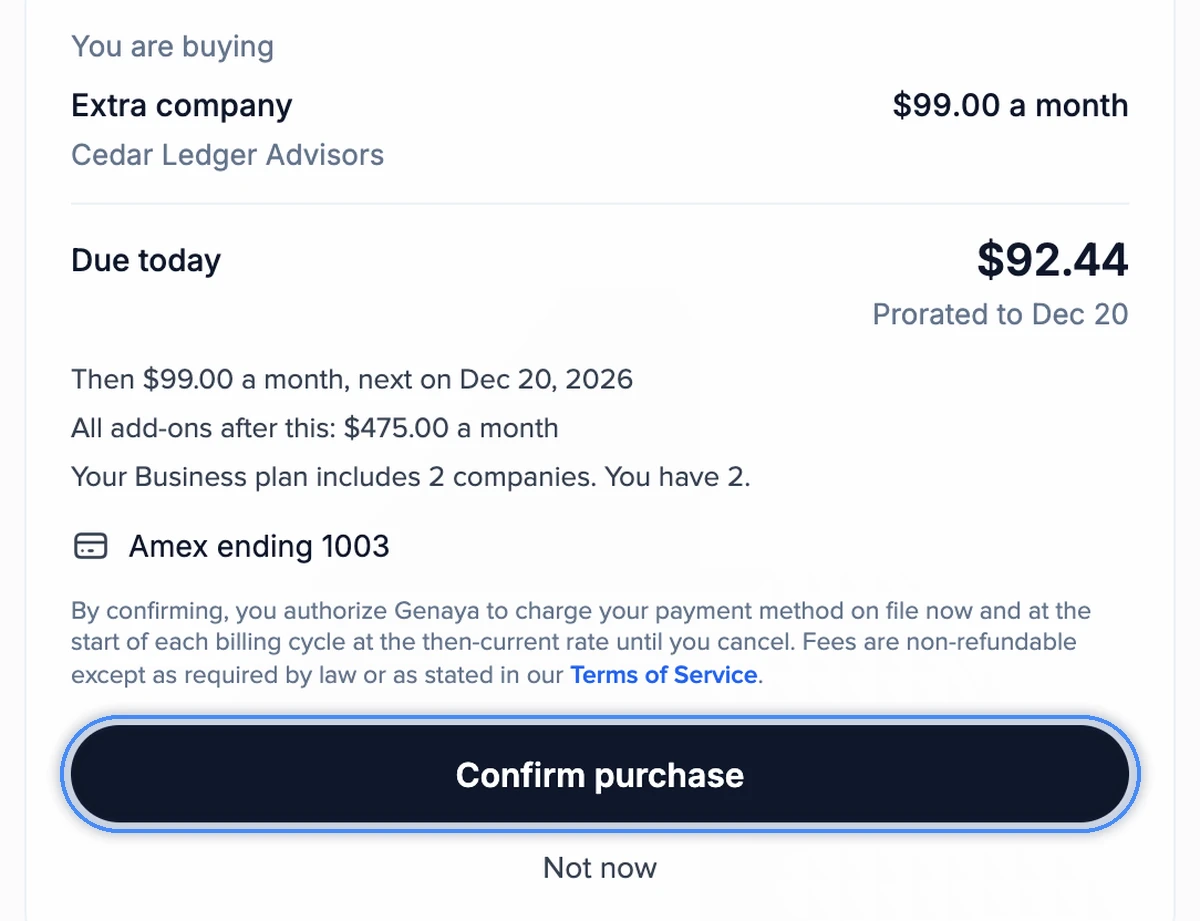
Every number on the card comes from your own plan and billing, the same numbers the charge uses. Genaya never types a price itself. The card holds its price for 30 minutes; after that it asks you to ask again for a fresh price.
Buy something from the chat
- 1Ask
Say what you need in the Genaya chat, for example "invite dana@harborpointdental.com to the team as a manager" or "turn on the AI Chat Receptionist". Genaya asks for anything missing, like the email of the person you invite.
- 2Read the card
Check what you are buying, the amount due today, what it costs after that and the card that pays.
- 3Press Confirm purchase
The button reads Paying while it works. When it is done, the card reads Paid with the amount, says what was done (for example "dana@harborpointdental.com is invited") and offers Receipt.
When the card asks for more
- A purchase of $2,500 or more due today always waits for your press of Confirm purchase, in every mode.
- When Genaya read something from outside in the same request, such as a customer's message, a web page, a pasted text or a file, the card says so, and you check the email, the phone number or the amount before you press Confirm purchase. Nothing written by someone else ever buys on its own: only your own press does.
- Some banks ask you to approve a payment. The card then says Your bank needs to approve this payment: press Approve payment and approve it in your bank's window. Nothing is charged until your bank approves, and the card then finishes by itself. A domain or a new company is finished on its own page instead: the card says so and opens Operations > Domains or Form a company, where you approve it.
What never buys
- Auto mode. A purchase waits on its card for your click in every mode.
- A plain "yes" in the chat. Only Confirm purchase buys.
- An agent, or an outside assistant you connected to Genaya. A purchase is always made by a person in the chat.
On the free trial, a team member, a company, a phone number or an add-on past what the trial includes waits for your plan: Genaya tells you what the trial includes and how to start your plan. Say start my plan and Genaya shows the purchase card for the plan your trial picked: the full price today, then every month or year.
Who can buy
The owner and admins can buy by default. For any other role, an owner or an admin turns on Buy for the organization from Genaya and Subscription and Billing under Settings > Roles and Permissions, next to the permission for what is bought, such as adding team members. A phone number is bought from the chat by the organization's owner only. A member who cannot buy gets one sentence instead of a card: "Buying from Genaya is not turned on for your role. Ask an owner or an admin to buy it, or to add the Buy for the organization from Genaya permission."
On the phone
The Genaya app never charges your card in the chat. On the phone a purchase card shows Continue to checkout, which opens the secure Genaya checkout in a sheet on top of the app, already signed in. Pay there and come back: the chat finishes what you asked. The price and the button show to a member who can buy, on iPhone and on Android phones in the United States; anywhere else the card says You can add it on the Genaya website. Domains and new LLCs are bought on the web.
Receipts and refunds
Receipt on the paid card opens Settings > Subscription & Billing > Payment History, where every charge has its invoice and Download invoice gives you the PDF. After that, a monthly extra or add-on is billed with your plan. A purchase has no Undo in the chat. Purchases are non-refundable except as required by law or as stated in our Terms of Servicearrow_outward.
Frequently asked
Still stuck?
Our team typically replies within one business day.